
# Content
In the age of information, the most valued thing today is data. With data, you can understand your customers, what you have to do next, opportunities that lie ahead. To manage these data we use various analytical tools like Google analytics.
# Real-life situation
I have been working with Google analytics for an eCommerce web application. The marketing team of that company used to give me the requirements of what data they need and like a good boy I kept implementing necessary code so that they can have their user data in the google analytics dashboard. This process is long. As we were following Scrum Agile Methodologies, we had to take the requirements from the marketing team, split them into stories and maybe take the stories for next sprint depending on the urgency and maybe after two weeks when the sprint is finished, we may be able to upload the feature to production.
One day a smart guy from the marketing team came up with a solution that we can use Google tag manager. He was tired of waiting for the feature to be implemented. As a marketing guy, it’s natural not to understand how the features are being implemented and why it is taking this much time. I understand his pain point and thus he told me to implement Google Tag Manager(GTM).
# What is Google Tag Manager
From the GTM docs,
“The Google tag manager container snippet is a small piece of JS and non-JS code that you paste into your pages. It enables Tag Manager to fire tags by inserting gtm.js into the page”
Wait, what?
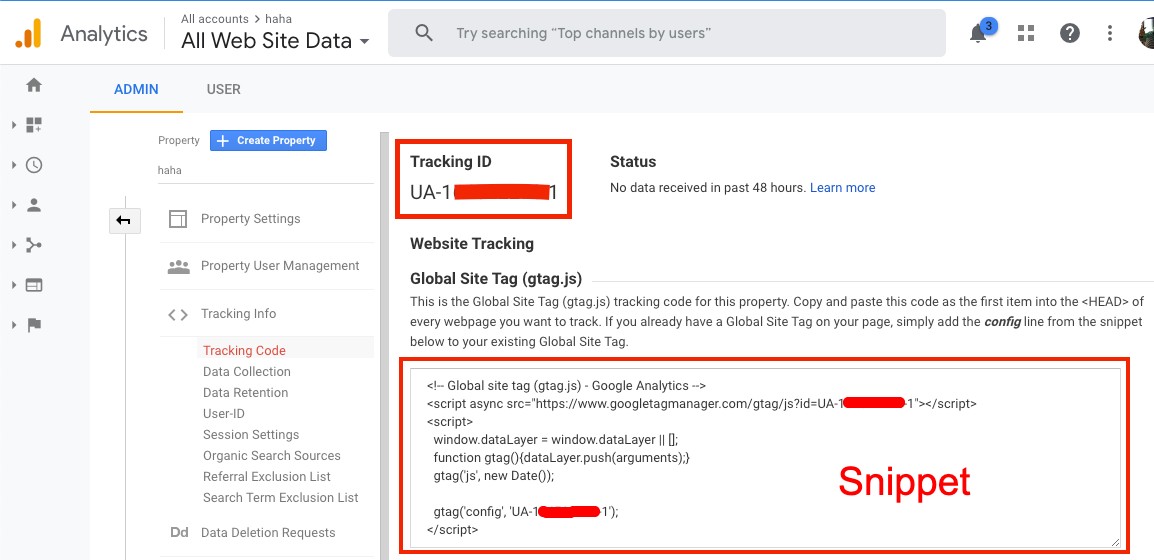
Before going deep, let me tell you how Google Analytics is injected into a website or web application. When you open an account on google analytics they will give you a Tracker ID and a JS Snippet. You put that tracker id on the appropriate place of that snippet and put that snippet into your website or web application. In most cases, it tells you to put the snippet within the <head> tag. Thus you start tracking your website’s user activities with google analytics.
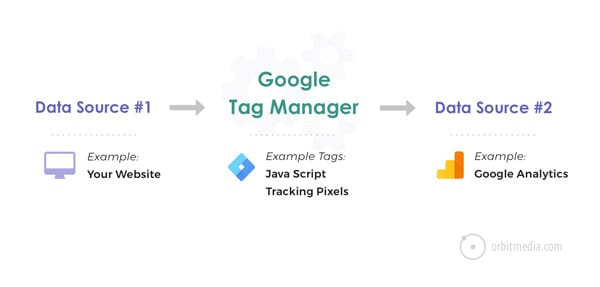
Now what is GTM? GTM is a free tool that allows you to link and manage marketing-related tags to your website or mobile app without having to touch any code. Tags mean snippets of codes or tracking pixels provide by the vendors (like google analytics snippet I mentioned earlier).
# Is GTM easy to use
Yes and No. You need to have some technical knowledge to use GTM. You need to know what Tags, Triggers, and Variables are and how to set them up. If you want to use Facebook pixel in GTM, you need to know how Facebook pixel tracking works.
In order to do event tracking, you need to know what event tracking is. what data can be tracked with the event, you need to clear understanding of ‘category’, ‘action’, ‘labels’ of the event.
# How GTM works
GTM has three major parts. Tags, Triggers, and Variables.
# Tags
Tags are JS snippet codes or tracking pixels that third party vendors provide to inject their tools into your site or app. Example,
- GA Universal Tracking Code
- Adwords Remarketing Code
- Adwords Conversion Tracking Code
- Heatmap Tracking Code
- Facebook Pixel

# Triggers
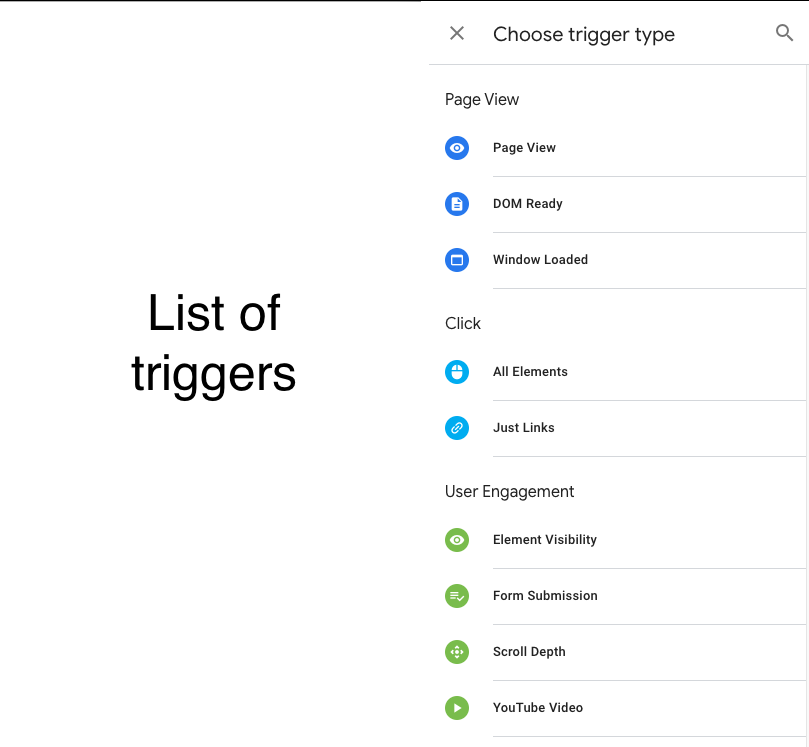
Trigger is a kind of setup to fire the tags. Trigger tells the tag manager when, how, and where to fire the tag. For example, when viewing a page, there may be a tag fire, or if you click on a link, there may be a tag fire, or there may be a custom trigger. Example,
- Page View: DOM Reads, Page View, Window Loaded
- Click: All elements, Just links
- Others: Custom event, Form Submission, History Change, JS Errors
# Variables
Variable is "additional info" which may require GTM for a specific tag. For example, we store GA's tracking id in a variable and use it in the tag manager with just the name of the variable.
# How GTM is different from Google Analytics
GTM is a completely different tool from GA. Here the code provided by the third party vendor can be shared and managed. There is no scope for analysis or reporting in GTM, but data can be customized. It acts as a Container for GA or other tags.
And GA is a complete analysis tool where all analysis and reporting are being done.
# Cons
Since any kind of third-party tool can be injected to the website or web app using the Tag Manager, the Marketing team can add tools of their choice without researching. This may affect the performance of the website or in the worst-case scenario the website may break. If the website breaks down for any reason or any side effects arise, the IT team had to deal with it without knowing anything. However, since the tags will be loaded asynchronously, there should not be any problem in loading the site.
Learning Resources You can follow GTM’s official documentation (opens new window). If you are into the video tutorial you can follow this Introduction to google tag manager (opens new window) series by Measure School.